Claude just stopped chatting! One sentence generates a storyboard and animation, delivering the final product directly.
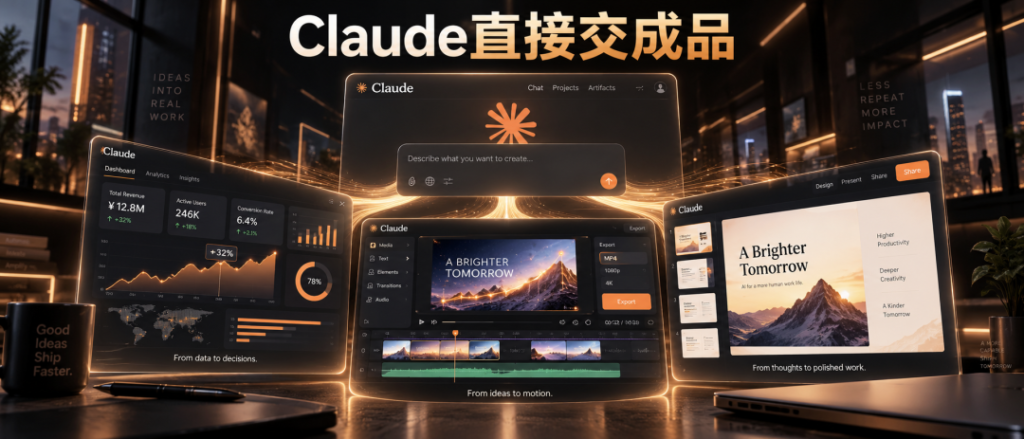
Just now, Claude stopped chatting! Generate dashboards and animations with a single sentence, delivering the final product directly
Content Summary
新智元报道 Claude大更新:动态看板、动画、PPT一起上!刚刚,Anthropic一口气官宣了三件事:实时仪表盘Dashboards上线,代码动画Mo
新智元报道
新智元报道
Claude大更新:动态看板、动画、PPT一起上!
刚刚,Anthropic一口气官宣了三件事:实时仪表盘Dashboards上线,代码动画Motion上线,文档Docs、幻灯片Slides、设计Design三件套摘掉beta标签——免费用户也能用。
上个月底,OpenAI刚在DevDay上高调推出ChatGPT Space,一个让Agent和同事在里面协作、维护动态图表和文档的项目中心。前后不到10天,Claude就把仪表盘和动画端上了桌。
X评论区已经炸了。
有人说「我200美元的Max套餐每天都在增值」,有人直接喊「根本跟不上你们的节奏」。
还有开发者追问:Dashboards什么时候开放API,让我在自己的应用里实时生成看板?
这个追问很说明问题。用户已经不满足于让AI出主意了,大家默认它该交成品。
Anthropic这次一共动了三样东西。
Docs、Slides、Design结束beta,所有计划都能用,包括免费版。自从这三样塞进每个对话以来,用户已经在Claude里做了超过4500万份文档、演示文稿和设计。
但新来的两个就没这么大方了。Dashboards还在beta,只对付费计划开放。Motion也在beta,门槛更高,只给Team和Enterprise两档企业用户。
所以免费用户拿到的是文档、幻灯片、设计三件套的正式版。想玩仪表盘和动画?得付费。
在公司里想知道一个数值,你通常只有两条路。
要么提工单,排在数据同事的待办清单后面慢慢等。要么自己去学SQL——就是从数据库里捞数据的那种专门语言,对着一堆表名发呆。
大多数人的选择很现实:等,或者干脆不看了。
Dashboards把这一步省了。
把Claude接上公司的数据平台(BigQuery、Snowflake、Databricks这些可以理解成存放全公司业务数据的大仓库),然后用大白话问一句「这周注册量和上个月比怎么样」。
Claude自己写查询、自己取数、自己搭看板。数据变了,看板跟着变。
接上Salesforce这样的CRM工具,还能给销售商机单独搭一块板。
但真正的卖点不是「会画图」,而是「看得见」。
点任何一个数字,背后那段查询就摊在你眼前。看不懂?让Claude解释。每张图都标着数据最后一次刷新的时间。
数据看清了,下一步是讲给别人听。
Motion管的就是这一段。
你可以让它把季度报告做成全员大会上30秒的讲解动画,给董事会PPT里的图表加动效,或者做一段给客户看的产品上手演示。
做完在编辑器里调,或者直接让Claude改,最后导出MP4。
一个做视频的功能,却一帧画面都不靠视频生成模型。
Claude写的是代码。文字怎么飞进来、图表怎么长出来、形状怎么变化,全写在代码里。
这个设计对汇报场景太关键了。汇报最怕的就是数字错。用生成模型做视频,一个数字错了只能整段重抽,抽出来别处可能又变了。
代码驱动的动画不一样,任何一个字、一个数字、一个时间点都能单独改。
说到做视频,Opus 5.5已经让人坐不住了
其实在Motion正式上线之前,Opus 5.5的代码动画能力已经在社交媒体上杀疯了。
Opus 5.5发布后,X的时间线迅速被各种动效短片淹没。
有人花15秒做了一段点餐发布片,一镜到底、无模板、纯代码。
更夸张的是,有人让Opus 5.5做了一个「Claude放假」的动画短片,拿下5.7万播放和1300多个赞。
别忘了,这些统统不是视频生成模型的产物。
但这恰恰说明了一件事——代码驱动动画的天花板,比大多数人想象得高得多。
Motion把这条路铺进了产品里,普通人不用折腾命令行,在对话框里说一句就行。
说点实在的。
模型之间的差距,普通人越来越难感觉到。
但少提一张工单、少熬一晚PPT,谁都感觉得到。
以前的分工是人干活,AI帮忙想。现在顺序倒过来了,AI先交第一版,人的价值挪到了判断这东西能不能发出去。
官方那句话说得很准:Claude做第一版,你决定分享什么。
这次更新还把协作那一步补上了。
团队成员和Claude可以同时编辑同一份文档、演示或看板。管理员允许的话,做好的东西还能分享给公司外的人。
导出的PowerPoint和PDF跟编辑器里看到的一模一样,演示文稿还能直接进Google Slides当可编辑文件。手机App上也能改。
OpenAI的ChatGPT Space面向Pro、Business、Enterprise用户,页面里放动态图表、协作文档和清单,能从连接的数据源自动更新,还能@同事和自家的Agent Dots去办事。
Claude这边是仪表盘、动画、文档、幻灯片、设计全家桶。
两家几乎同时盯上了同一块地方:打工人每天的那张办公桌。
以前大家盯着谁的模型分数高,现在要看谁先成为打工人每天第一个打开的窗口。
长期看,用户从哪个窗口开始干活,话语权就在谁手里。等大家习惯了先在对话框里要一个初稿,专业软件就慢慢变成了Claude后面的那道工序。
工作产出的最后一公里,就是从「答案」到「能直接发出去的东西」之间那段路。谁把这段路铺平,谁就赢下办公桌。
参考资料:https://x.com/claudeai/status/2108271552991252810
编辑:所罗门
Xinzhiyuan reports
Xinzhiyuan reports
Claude major update: live dashboards, animations, and PPTs all coming!
Just now, Anthropic announced three things at once: the real‑time Dashboards are live, Motion code animations are available, and the Docs, Slides, and Design suite shed its beta tag—free users can use them too.
At the end of last month, OpenAI proudly unveiled ChatGPT Space at DevDay—a project hub where agents and teammates collaborate, maintaining dynamic charts and documents. In less than ten days, Claude rolled out the dashboard and animation.
The X comment section has already blown up.
Someone said, “My $200 Max plan keeps appreciating every day,” while others shouted, “I can’t keep up with your pace at all.”
Some developers also ask: When will Dashboards open an API so I can generate dashboards in real time within my own application?
This follow‑up question highlights the issue. Users are no longer satisfied with AI just offering ideas; they expect it to deliver a finished product.
Anthropic has introduced three things this time.
Docs, Slides, and Design have exited beta, and all plans can use them, including the free tier. Since these three were embedded into every conversation, users have already created over 45 million documents, presentations, and designs in Claude.
But the two newcomers aren’t as generous. Dashboards are still in beta and only available to paid plans. Motion is also in beta, with a higher threshold, limited to Team and Enterprise tiers.
So free users get the official versions of the document, slide, and design trio. Want to play with dashboards and animations? You have to pay.
In a company, when you want to know a number, you usually have only two ways.
Either submit a ticket and wait slowly behind the data team’s to‑do list, or teach yourself SQL — the specialized language for pulling data from databases, staring at a bunch of table names.
Most people make a very pragmatic choice: wait, or just not look at it.
Dashboards skip this step.
Connect Claude to the company’s data platform (BigQuery, Snowflake, Databricks—think of them as large warehouses storing all business data), then ask in plain language, “How does this week’s registration count compare to last month?”
Claude writes the query, fetches the data, and builds the dashboard itself. When the data changes, the dashboard updates accordingly.
By integrating a CRM tool like Salesforce, you can also set up a dedicated board for sales opportunities.
But the real selling point isn’t “being able to draw charts,” it’s “being able to see them.”
Click any number, and the underlying query is laid out before you. Can’t understand it? Let Claude explain. Each chart is labeled with the time the data was last refreshed.
The data is clear, the next step is to explain it to others.
Motion handles this part.
You can have it turn the quarterly report into a 30‑second explanatory animation for the all‑hands meeting, add motion effects to charts in the boardroom PPT, or create a product walkthrough demo for customers.
Afterward, fine‑tune it in the editor, or let Claude edit it directly, then export as MP4.
A video creation function that doesn’t rely on video generation models for even a single frame.
Claude writes the code. How text flies in, how charts appear, how shapes transform—everything is encoded in the code.
This design is crucial for reporting scenarios. The biggest fear in reporting is a wrong number. When using generative models for video, a single incorrect digit forces you to re‑render the entire segment, and the corrected part may change elsewhere.
Code-driven animations are different; any character, any number, any timestamp can be changed individually.
When it comes to making videos, Opus 5.5 makes it hard to sit still.
In fact, even before Motion officially launched, Opus 5.5’s code animation capabilities had already gone viral on social media.
After Opus 5.5 was released, X’s timeline was quickly flooded with various animated short clips.
Someone spent 15 seconds to create an ordering release video—a single continuous shot, no templates, pure code.
Even more exaggerated, someone had Opus 5.5 create a short animation titled “Claude on Vacation,” which garnered 57,000 views and over 1,300 likes.
Don’t forget, none of these are products of video‑generation models.
But that precisely shows one thing—code‑driven animation has a ceiling far higher than most people imagine.
Motion paves this path into the product, so ordinary users don’t have to tinker with the command line; just say a line in the dialog.
Let’s be realistic.
The gap between models is becoming increasingly hard for ordinary users to perceive.
But skipping a ticket or staying up one less night on a PPT, everyone can feel the difference.
Previously the division of labor was people doing the work and AI helping with ideas. Now the order is reversed: AI delivers the first draft, and human value shifts to judging whether it can be released.
The official line hits the nail on the head: Claude creates the first draft, you decide what to share.
This update also adds the collaboration step.
Team members and Claude can simultaneously edit the same document, presentation, or board. If the admin allows, the finished work can also be shared with people outside the company.
Exported PowerPoint and PDF look exactly the same as in the editor, and presentations can be opened directly in Google Slides as editable files. They can also be edited on the mobile app.
OpenAI’s ChatGPT Space is aimed at Pro, Business, and Enterprise users; the page includes dynamic charts, collaborative documents, and checklists, can automatically update from connected data sources, and you can @ colleagues and your own Agent Dots to get things done.
Claude offers a full suite of dashboards, animations, documents, slides, and design tools.
Both companies have almost simultaneously set their sights on the same spot: the office desk that workers use every day.
Before, everyone focused on whose model score was higher; now we look at who becomes the first window a worker opens each day.
In the long run, whoever the user starts working from will hold the speaking power. Once people get used to asking for a draft in the chat window first, professional software will gradually become just another step after Claude.
The last mile of work output is the stretch between the “answer” and the “thing that can be sent out directly.” Whoever smooths this road wins the desk.
Reference: https://x.com/claudeai/status/2108271552991252810
Edited by: Solomon